Every risk and audit committee cycle ends the same way: someone pulls the latest numbers from a handful of systems and spreadsheets, pastes them into a deck, writes a paragraph or two of commentary, and sends it out before the meeting. Done well, a board pack takes a real exposure and makes it legible to people who were not in the room when it was identified. Done badly, it is a wall of tables nobody reads past the first page. The difference is rarely the data. It is almost always the structure.
The Shape of a Good Board Pack
A board or committee pack that actually gets read tends to follow the same shape, regardless of whether it covers enterprise risk, IT, SHEQ or ESG:
- A cover slide stating what it is, for whom, and the period it covers
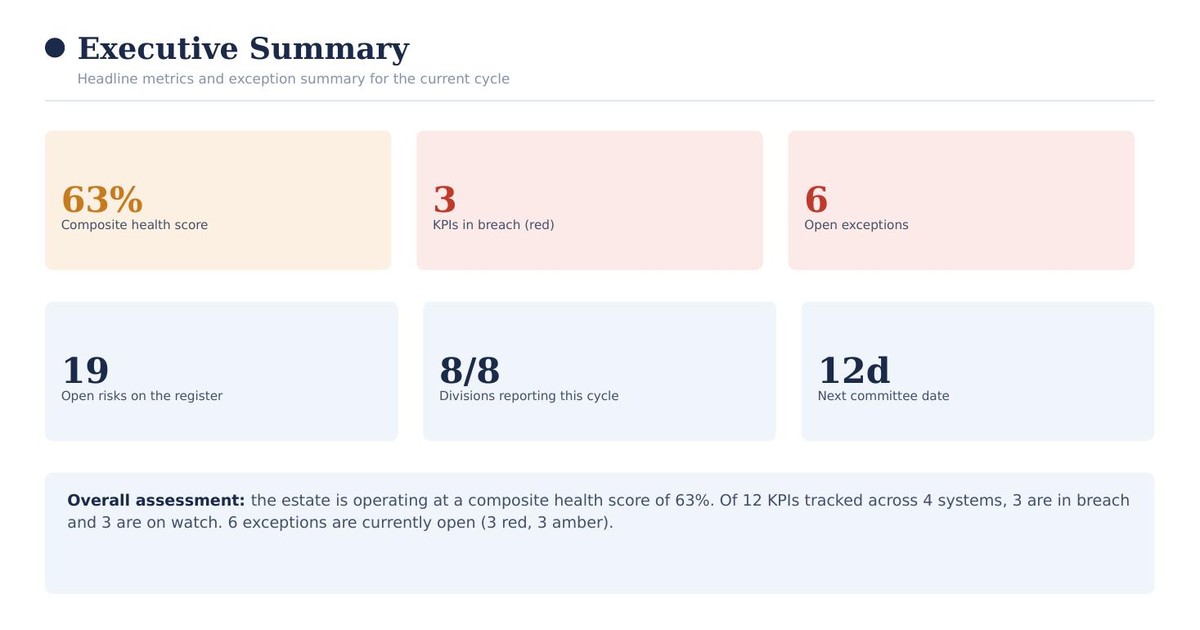
- An executive summary with no more than six or seven headline numbers
- A scorecard of the KPIs the committee is accountable for, status-coded
- The items that actually need attention this cycle, not the full register
- A breakdown by category, division or business unit, reconciled to the same totals
- Clear, specific recommended actions, not a restatement of the problem
The order matters almost as much as the content. A reader should be able to stop after the executive summary and the focus-area section and already know what decisions the committee needs to make. Everything after that is supporting detail for the people who want to go deeper.
The Executive Summary: Six Numbers, Not Sixty
The most common failure mode is an executive summary that tries to say everything. A useful one picks a small number of figures that would change someone's view of the period if they were wrong: a composite health score, how many items are in breach of target, how many exceptions are open, and two or three figures specific to that function, such as open risks on the register or divisions that reported on time.
Everything else belongs further back in the pack. If a number is not important enough to influence a decision, it does not belong on the first page.
The KPI Scorecard
A scorecard lists every metric the committee is formally accountable for, each with its actual value, its target, a status (on target, watch or breach), and an owner. The value of a scorecard is completeness: a committee member should be able to find any metric they are responsible for on one page, not search for it.
Status colour-coding only works if the bands are defined and applied consistently. "Watch" should mean the same distance from target every time it appears, not a judgement call that varies by who compiled the slide that month.
Where Leadership Should Focus
This is the section that earns its place in the pack by not trying to cover everything. It lists only the items currently in breach or on watch, each with enough context to act on: the current value against target, who owns it, when it was raised, and its current status. A pack with forty KPIs might reasonably have six or eight items here. If every item is in this section, the scorecard above it is not doing its job.
Reconciliation: The Detail Committees Actually Check
Every number in the pack should trace back to the same source. If the executive summary says eight items are outside appetite and the detailed register lists a different count, that discrepancy is usually the first thing a sharp committee member will ask about, and for good reason: it suggests the summary and the detail were not built from the same data.
The safest way to guarantee this is to generate every section of the pack, from the summary stat cards to the detailed register extract, from one reconciled dataset, rather than having different contributors compile different sections by hand from different sources.
A Practical Example
XGRC®'s IT Risk & Performance Committee dashboard follows this structure end to end: an executive summary, a KPI scorecard, a focus-area section, a risk register extract and a division-by-division breakdown, all reconciled to the same underlying risk data. The dashboard's "Export board pack" button turns that live data straight into a formatted PowerPoint deck in one click, in the same structure described above, rather than requiring someone to rebuild it by hand each cycle.
It is one of seventeen live, interactive examples in the XGRC® dashboard tour, each on fictitious data, so you can click through and export a sample pack yourself to see the structure in practice.