
Internal audit should provide clear assurance, not administrative overhead.
XGRC® is internal audit software that lets organisations plan, execute and manage audits in a structured, consistent way. It connects audits to risks, controls and actions on a single platform, giving full visibility across the audit lifecycle.
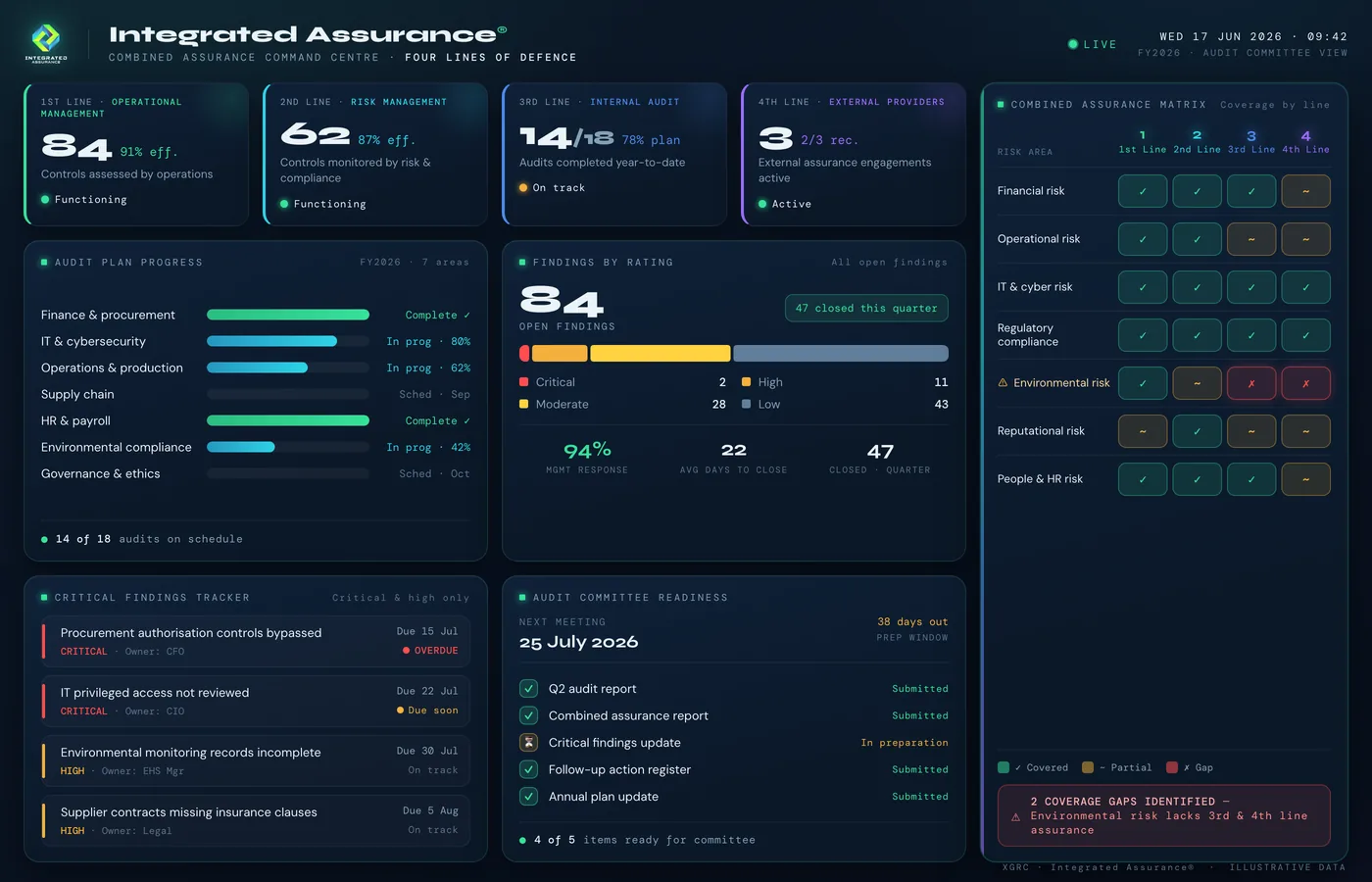
Disconnected tools weaken assurance.
Many organisations still manage audits across disconnected tools, which leads to delays, missed actions and weak assurance reporting.
-
Audit plans live in spreadsheets
-
Findings tracked in email or documents
-
Limited visibility of audit progress
-
No clear link between risks, controls and audit outcomes
The full audit lifecycle in one system.
- 01
Plan audit programmes
- 02
Define scope and audit criteria
- 03
Execute audits using structured checklists
- 04
Capture findings in real time
- 05
Assign and track corrective actions
- 06
Report on outcomes and assurance levels
Structured by default, connected by design.
- Central audit planning and scheduling
- Configurable audit checklists and templates
- Real-time capture of findings and evidence
- Automated action assignment and tracking
- Integrated reporting and dashboards
 Integrated Assurance
One connected view of assurance
Audit activities link directly to risk management, incident management and corrective actions, so every finding traces back to a risk and forward to an action. Nothing falls between systems.
The same audit, without the friction.
Manual approach: Static checklists
XGRC® approach: Structured audit workflows
Manual approach: Findings tracked in documents
XGRC® approach: Centralised findings register
Manual approach: Actions managed via email
XGRC® approach: Automated action tracking
Manual approach: Manual reporting
XGRC® approach: Real-time dashboards and reports
Internal Audit Checklist (ISO-aligned)
- Audit planning steps
- Risk and control review
- Audit execution guidance
- Findings classification
- Follow-up and closure
Explore the connected platform.
Solution Integrated Assurance
Internal Audit & Combined Assurance
Explore Integrated Assurance → Use Case
Risk Management
XGRC® is risk management software that lets organisations identify, assess and manage risks in a structured, consistent way. It connects risks to controls, actions and assurance activities on a single platform, giving clear visibility of risk exposure across the organisation.
View use case → Use Case Internal Controls
XGRC® is internal controls software that lets organisations design, implement, test, and assure controls in a structured way. Every control is linked to the risk it mitigates and the assurance provider testing it, so control effectiveness is demonstrable at any time.
View use case → Use Case Integrated Assurance
XGRC® coordinates internal audit and combined assurance across your organisation, linking every finding to the risk it relates to and the controls meant to manage it. Every line of defence works from the same assurance map.
View use case →Common questions.
01What is internal audit software?
Internal audit software is a system for planning, executing and reporting on audits in one place, connecting each audit to the risks, controls and corrective actions it relates to, instead of managing plans and findings across spreadsheets and email.
02Can XGRC® handle multiple audit types on one platform?
Yes. XGRC® supports internal audits, ISO audits, compliance audits, risk-based audits and combined assurance on the same platform, using the same findings register and action-tracking workflow.
03How does XGRC® link audit findings to risk management?
Every audit finding can be linked directly to a risk and its existing controls, so a finding traces back to the risk it relates to and forward to the corrective action assigned to close it — visible on one dashboard.
04Which standards does the internal audit module align to?
The audit module is aligned to ISO 9001, ISO 14001, ISO 45001, ISO 27001, ISO 31000 and COSO, and the downloadable checklist reflects this alignment.
See internal audit as a structured, integrated process.
Book a demo to see how XGRC® turns audit planning, execution, findings and follow-up into one connected workflow.
Where should we send your download link?
Enter your details and we will email you the link to the checklist.
Your checklist is ready.
Click the button below to download the PDF. We have also sent this link to your email.
Download the checklist (PDF)